Articles by "Android"

Showing posts with label Android. Show all posts


Hello World,Toady I will Share Basic Android App Development Guideline.

Chapter 1: Hello World

  • Android Activity
  • UI design with TextView, Layout. Use most used properties of TextView and layout
  • Input with: EditText, Button, Radio Button, Checkbox
Project: Design a calculator.

Chapter 2: Some basic views, phone call and email

  • ImageView
  • WebView
  • ListView
  • CardView
  • RecyclerView
  • Phone Call
  • Email
Project: Develop a static information App for your class. It contains all the information of your classmates. Also functional for phone call and email them.

Chapter 3: Data storage

  • SharedPreference
  • SQLite database
  • Android default camera
Project: Create an App for storing all information of your friends with photo. All information will be stored in SQLite database. Have to perform CRUD operations

Chapter 4: Connect to the server

  • Introduction to PHP
  • Introduction to GET and POST method
  • Retrofit network library
  • JSON object and JSON array basic idea
  • Send data to the server and receive response from the server
  • Scraping data from web page using JSOUP library
Project: Login and registration from App, connecting PHP backend and data storing on remote MySQL server. Edit user information from app.

Chapter 5: Material Design

  • Idea of material design
  • Navigation drawer
  • Fragment
  • Floating Action Button (FAB
  • Pull to refresh (Swipe refresh)
Project: Develop a TO DO list App using material design. Implement Navigation drawer, fragment, FAB and pull to refresh. User can store data in local storage or can upload to the server.

Chapter 6: Multimedia

  • Introduction to background service
  • Play an audio file in as a background service
  • Play a video file
Project: Develop an App to manage your favorite audio, video of your device. All of audios and videos can be played using the App.

Chapter 7: Git

  • Introduction to VCS
  • Introduction to Git
  • Introduction to GitHub and BitBucket
  • Some basic commands like initialization, add remote, commit, push, pull etc.

Chapter 8: Firebase

  • Firebase analytics
  • Firebase Crash Reporting
  • Firebase push notification using PHP backend

Chapter 9: GPS

  • Get latitude and longitude
  • Place a marker of current location on Map
  • Find city name or country name using Reverse GeoCoding

Chapter 10: App distribution

  • App build in release mode
  • Publish App to Google Play Store
  • Maintenance and update of existing App

Some popular Libraries and Tools

  • ButterKnife
  • EventBus&nbsp
  • Picasso
  • Retrofit
  • Gson
  • jsoup
  • ADB tool
  • ProGuard tool
  • POJO generator plugin

Hello guys today i will show you how to move games data/obb file to your sd card without rooting your phone.
"do at your own risk" it is not my responsibility if your phone breaks or whatever

Folllow Steps:

first make sure android version up to 6+ and download these apps
  1. virtualxposed download
  2. .. Download
  3. zarchiver download
  4. .. Download
note: before doing all of these steps, make sure the data/obb file of the game is placed on the sd card. [this method is only tested on offline games]
  1. after downloading and installing virtualxposed, open it and swipe down the screen.
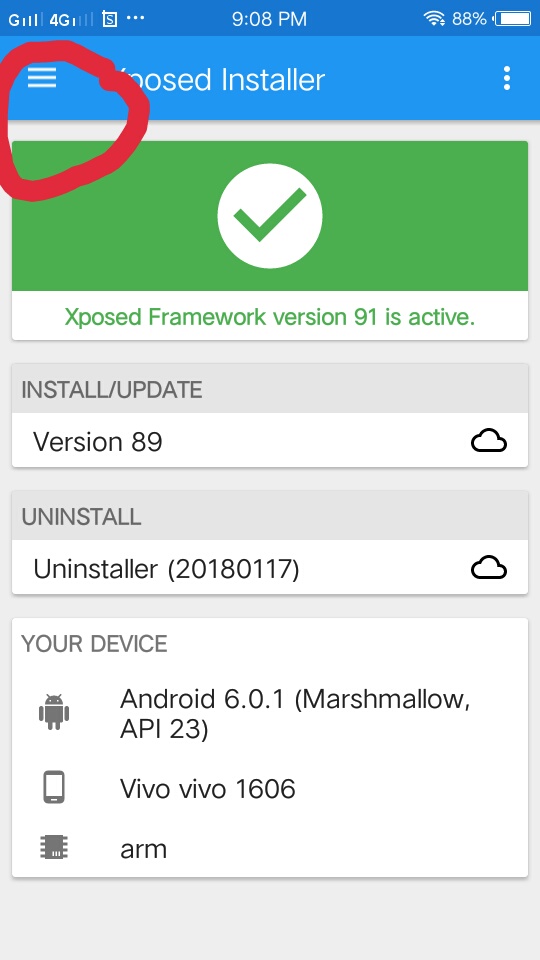
  2. after swiping down the screen, open xposed installer.
  3. after opening the installer, click the 3 horizontal lines on the upper left side and click download.
  4. search "xinternalsd" choose 4.8 version and click download and install.
  5. when the installation is finished, click the 3 horizontal lines again on the upper left side and find modules. make sure to check the box "xinternalsd".
  6. go back and click the circle with 6 dots , and click "add app".
  7. select/check the google play games, google services, google playstore and the games you want to move the data/obb file to your sd card.
  8. go back and swipe down the screen, open xinternalsd.
  9. in xinternalsd, click "path to internal sd card" if you don't know what your going to do there, download and install "zarchiver" and check the name of your sdcard.
  10. click "enable for apps" and check those again.
  11. after doing all these steps, you must play the game in virtualxposed.
Any type of information please Contact us.

Here we go with our very first method of wifi password hacking with android using rooting process, after rooting there will be no rooting wifi hacking method too.


 Disclaimer: Please I won’t be held responsible for any illegal activity this WiFi hacks tricks is used for, it’s just for knowledge  & Education sake, just mug this for educational purpose.


 Method #1: Hacking of WPA2 WPS Router


#1. Firstly, if your android phone isn’t rooted, try to root it, and also make sure that such android phone have a Broadcom bcm4329 or bcm 4330 chipest unlike the Nexus 7, Galaxy S1/S2, Nuxus 1, Htc Desire HD, etc. The presence of Cyanogen ROM on your device can be of use to make the bcmon app work through.
#2. Then download and install Bcmon, it’s essential because it helps monitor mode on your broadcom chipest that helps in the PIN Cracking.
#3. After installation, run the app and tap “monitor mode” option.
#4. Download and Install Reaver app which helps to crack the WPS Pinto retrieve the WPA2 passphrase.
#5. After installation of reaver app, launch it and do an on-screen confirmation, which is, confirming that you’re not using it for an illegal purpose, then tap the APN or access point you’d wish to crack and continue. Most times, you might need to verify monitor mode to proceed, and this would cause the bcmon to open again.
#6. Verify your settings and also make sure that you’ve checked the Automatic Advanced settings” box.
#7. Finally, start cracking process by tapping start attack, at this final stage, it can take 2-10hrs for the cracking of WPS to be successful.

Method #2: WPS WPA TESTER (Hack Wifi from android mobile without Rooting)

WPS Connect app hack only WPS routers with limited features. But this is an advanced app for hacking wifi password from android mobile without rooting. You can check the wireless security of your routers from this Android app. If your router is not secure this wifi hacking android app easily bypass wifi password from android mobile and connect with android mobile to router directly without need any type of password.
This wifi hacking Android apps works in both rooted and without rooted android mobile. So you can easily hack wifi password from your android phone without rooting your android phone with this app.
WIFI WPS WPA TESTER
Price: Free
Latest WiFi Password Hacking on Android are More in below’s links and all wifi password hacking using android are tested and working with our professional’s Editors.

Method #3: Hack Wifi On Android Using AndroDumper App

Well, Another wifi hacking app without even rooting android is here. AndroDumper App is the best android application which helps you to hack wifi passwords on the non-rooted android device. For use, Andro Dumper android application follows below  Just follow the below steps to execute this process:
Step 1: First you need to download and installAndroDumper App‘.
Step 2: After successfully Installation, Open that app on your android device.
Step 3: Now press the refresh button at top of the screen in the app.
Step 4: Select try connects option from the pop-up and this app finds wifi password within a few seconds.
Well, you can try this app as well if above apps are not working properly. The very basic thing you need to keep in your mind is to proceed this hack when the wifis security is low.

Method #4: Hack WiFi On Non-Rooted Android Using Bcmon Android App

Bcmon is another android wifi hacking app and it is used to enable monitor mode on your rooted android device.  Bcmon app is required the rooted android device. This android app required rever android app is used to attack WPS enabled routers and find the WPA key. Bcmon App required approx 2-3 hours to crack WPS enable wifi network. This is working method, all you need to follow
Step 1: First you need to download and install Bcmon App on your android device.
Step 2: And install firmware tools and click on enable monitor mode and then download rever and install on your android device.
Step 3: After that check the box of an automatically advanced setting option. Rever is used to check available access point of WPS enables wifi networks.
Step 4: After scan chooses the WPS to enable network and click on start attack button.
switcher
Layout
Boxed Full
Boxed Background Image
Main Color
#007ABE

Shawon Khan

{picture#https://blogger.googleusercontent.com/img/b/R29vZ2xl/AVvXsEh-a3-41YjYcJBZ5a8ARnrIkWEipCX5qC85U1TNiYgbjJtaIFGfVP5tGH2AqJOpDQCpktO4gvGceSGs2mFo8oDGHnw5RQIbSesYA7jEiCfHO8zoYhk3FNcKaXDjxIcSGKc6qL6_HvsmXiri/s50/avatku.jpg} Nor is it at all prudent for the hunter to be over curious touching the precise nature of the whale spout. {facebook#http://facebook.com} {twitter#http://twitter.com} {google#http://google.com} {pinterest#http://pinterest.com} {youtube#http://youtube.com}

Contact Form

Name

Email *

Message *

Powered by Blogger.