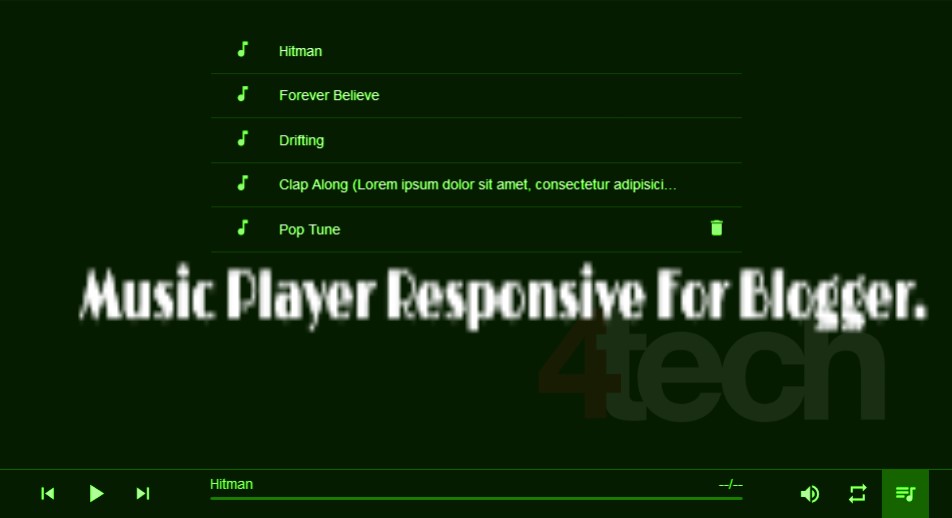
Music player widget on blogs responsive. The music player widget is made responsive to customize the tools that are often used today, namely smartphones.
For you who want to put music widget on their blog and happen to use responsive template then you can try this music player widget. This music widget you can put your own choice song.
The music player widget will not automatically play songs, so your blog visitors or should press the play button to play a song that is attached to this widget. In addition there is also a button play button -button other, like, Pause, Next, prev, volume, random, menu music list. The interface you can see the demo below.
<!-- Audio player -->
<div class="ap"id="ap"><div class="ap-inner"><div class="ap-panel"><div class="ap-item ap--playback"><button class="ap-controls ap-prev-btn"><svg xmlns="http://www.w3.org/2000/svg"fill="#ffffff"height="24"viewBox="0 0 24 24"width="24"><path d="M6 6h2v12H6zm3.5 6l8.5 6V6z"/><path d="M0 0h24v24H0z"fill="none"/></svg></button><button class="ap-controls ap-toggle-btn"><svg xmlns="http://www.w3.org/2000/svg"fill="#fff"height="30"viewBox="0 0 24 24"width="30"class="ap--play"><path d="M8 5v14l11-7z"/><path d="M0 0h24v24H0z"fill="none"/></svg><svg xmlns="http://www.w3.org/2000/svg"fill="#ffffff"height="30"viewBox="0 0 24 24"width="30"class="ap--pause"><path d="M6 19h4V5H6v14zm8-14v14h4V5h-4z"/><path d="M0 0h24v24H0z"fill="none"/></svg></button><button class="ap-controls ap-next-btn"><svg xmlns="http://www.w3.org/2000/svg"fill="#ffffff"height="24"viewBox="0 0 24 24"width="24"><path d="M6 18l8.5-6L6 6v12zM16 6v12h2V6h-2z"/><path d="M0 0h24v24H0z"fill="none"/></svg></button></div><div class="ap-item ap--track"><div class="ap-info"><div class="ap-title">Unknown</div><div class="ap-time"><span class="ap-time--current">--</span><span>/</span><span class="ap-time--duration">--</span></div><div class="ap-progress-container"><div class="ap-progress"><div class="ap-bar"></div><div class="ap-preload-bar"></div></div></div></div></div><div class="ap-item ap--settings"><div class="ap-controls ap-volume-container"><button class="ap-volume-btn"><svg fill="#ffffff"height="48"viewBox="0 0 24 24"width="24"xmlns="http://www.w3.org/2000/svg"class="ap--volume-on"><path d="M3 9v6h4l5 5V4L7 9H3zm13.5 3c0-1.77-1.02-3.29-2.5-4.03v8.05c1.48-.73 2.5-2.25 2.5-4.02zM14 3.23v2.06c2.89.86 5 3.54 5 6.71s-2.11 5.85-5 6.71v2.06c4.01-.91 7-4.49 7-8.77s-2.99-7.86-7-8.77z"/><path d="M0 0h24v24H0z"fill="none"/></svg><svg xmlns="http://www.w3.org/2000/svg"fill="#ffffff"height="48"viewBox="0 0 24 24"width="24"class="ap--volume-off"><path d="M7 9v6h4l5 5V4l-5 5H7z"/><path d="M0 0h24v24H0z"fill="none"/></svg></button><div class="ap-volume"><div class="ap-volume-progress"><div class="ap-volume-bar"></div></div></div></div><button class="ap-controls ap-repeat-btn"><svg fill="#ffffff"height="24"viewBox="0 0 24 24"width="24"xmlns="http://www.w3.org/2000/svg"><path d="M0 0h24v24H0z"fill="none"/><path d="M7 7h10v3l4-4-4-4v3H5v6h2V7zm10 10H7v-3l-4 4 4 4v-3h12v-6h-2v4z"/></svg></button><button class="ap-controls ap-playlist-btn"><svg fill="#ffffff"height="24"viewBox="0 0 24 24"width="24"xmlns="http://www.w3.org/2000/svg"><path d="M0 0h24v24H0z"fill="none"/><path d="M15 6H3v2h12V6zm0 4H3v2h12v-2zM3 16h8v-2H3v2zM17 6v8.18c-.31-.11-.65-.18-1-.18-1.66 0-3 1.34-3 3s1.34 3 3 3 3-1.34 3-3V8h3V6h-5z"/></svg></button></div></div></div></div>
<script>
;(function(window,undefined){'use strict';var AudioPlayer=(function(){var player=document.getElementById('ap'),playBtn,prevBtn,nextBtn,plBtn,repeatBtn,volumeBtn,progressBar,preloadBar,curTime,durTime,trackTitle,audio,index=0,playList,volumeBar,volumeLength,repeating=false,seeking=false,rightClick=false,apActive=false,pl,plLi,settings={volume:0.1,autoPlay:false,notification:true,playList:[]};function init(options){if(!('classList'in document.documentElement)){return false}if(apActive||player===null){return}settings=extend(settings,options);playBtn=player.querySelector('.ap-toggle-btn');prevBtn=player.querySelector('.ap-prev-btn');nextBtn=player.querySelector('.ap-next-btn');repeatBtn=player.querySelector('.ap-repeat-btn');volumeBtn=player.querySelector('.ap-volume-btn');plBtn=player.querySelector('.ap-playlist-btn');curTime=player.querySelector('.ap-time--current');durTime=player.querySelector('.ap-time--duration');trackTitle=player.querySelector('.ap-title');progressBar=player.querySelector('.ap-bar');preloadBar=player.querySelector('.ap-preload-bar');volumeBar=player.querySelector('.ap-volume-bar');playList=settings.playList;playBtn.addEventListener('click',playToggle,false);volumeBtn.addEventListener('click',volumeToggle,false);repeatBtn.addEventListener('click',repeatToggle,false);progressBar.parentNode.parentNode.addEventListener('mousedown',handlerBar,false);progressBar.parentNode.parentNode.addEventListener('mousemove',seek,false);document.documentElement.addEventListener('mouseup',seekingFalse,false);volumeBar.parentNode.parentNode.addEventListener('mousedown',handlerVol,false);volumeBar.parentNode.parentNode.addEventListener('mousemove',setVolume);document.documentElement.addEventListener('mouseup',seekingFalse,false);prevBtn.addEventListener('click',prev,false);nextBtn.addEventListener('click',next,false);apActive=true;renderPL();plBtn.addEventListener('click',plToggle,false);audio=new Audio();audio.volume=settings.volume;if(isEmptyList()){empty();return}audio.src=playList[index].file;audio.preload='auto';trackTitle.innerHTML=playList[index].title;volumeBar.style.height=audio.volume*100+'%';volumeLength=volumeBar.css('height');audio.addEventListener('error',error,false);audio.addEventListener('timeupdate',update,false);audio.addEventListener('ended',doEnd,false);if(settings.autoPlay){audio.play();playBtn.classList.add('playing');plLi[index].classList.add('pl-current')}}function renderPL(){var html=[];var tpl='<li data-track="{count}">'+'<div class="pl-number">'+'<div class="pl-count">'+'<svg fill="#000000" height="20" viewBox="0 0 24 24" width="20" xmlns="http://www.w3.org/2000/svg">'+'<path d="M0 0h24v24H0z" fill="none"/>'+'<path d="M12 3v10.55c-.59-.34-1.27-.55-2-.55-2.21 0-4 1.79-4 4s1.79 4 4 4 4-1.79 4-4V7h4V3h-6z"/>'+'</svg>'+'</div>'+'<div class="pl-playing">'+'<div class="eq">'+'<div class="eq-bar"></div>'+'<div class="eq-bar"></div>'+'<div class="eq-bar"></div>'+'</div>'+'</div>'+'</div>'+'<div class="pl-title">{title}</div>'+'<button class="pl-remove">'+'<svg fill="#000000" height="20" viewBox="0 0 24 24" width="20" xmlns="http://www.w3.org/2000/svg">'+'<path d="M6 19c0 1.1.9 2 2 2h8c1.1 0 2-.9 2-2V7H6v12zM19 4h-3.5l-1-1h-5l-1 1H5v2h14V4z"/>'+'<path d="M0 0h24v24H0z" fill="none"/>'+'</svg>'+'</button>'+'</li>';playList.forEach(function(item,i){html.push(tpl.replace('{count}',i).replace('{title}',item.title))});pl=create('div',{'className':'pl-container hide','id':'pl','innerHTML':!isEmptyList()?'<ul class="pl-list">'+html.join('')+'</ul>':'<div class="pl-empty">PlayList is empty</div>'});player.parentNode.insertBefore(pl,player.nextSibling);plLi=pl.querySelectorAll('li');pl.addEventListener('click',listHandler,false)}function listHandler(evt){evt.preventDefault();if(evt.target.className==='pl-title'){var current=parseInt(evt.target.parentNode.getAttribute('data-track'),10);index=current;play();plActive()}else{var target=evt.target;while(target.className!==pl.className){if(target.className==='pl-remove'){var isDel=parseInt(target.parentNode.getAttribute('data-track'),10);playList.splice(isDel,1);target.parentNode.parentNode.removeChild(target.parentNode);plLi=pl.querySelectorAll('li');[].forEach.call(plLi,function(el,i){el.setAttribute('data-track',i)});if(!audio.paused){if(isDel===index){play()}}else{if(isEmptyList()){empty()}else{audio.src=playList[index].file;document.title=trackTitle.innerHTML=playList[index].title;progressBar.style.width=0}}if(isDel<index){index--}return}target=target.parentNode}}}function plActive(){if(audio.paused){plLi[index].classList.remove('pl-current');return}var current=index;for(var i=0,len=plLi.length;len>i;i++){plLi[i].classList.remove('pl-current')}plLi[current].classList.add('pl-current')}function error(){!isEmptyList()&&next()}function play(){index=(index>playList.length-1)?0:index;if(index<0)index=playList.length-1;if(isEmptyList()){empty();return}audio.src=playList[index].file;audio.preload='auto';document.title=trackTitle.innerHTML=playList[index].title;audio.play();notify(playList[index].title,{icon:playList[index].icon,body:'Now playing',tag:'music-player'});playBtn.classList.add('playing');plActive()}function prev(){index=index-1;play()}function next(){index=index+1;play()}function isEmptyList(){return playList.length===0}function empty(){audio.pause();audio.src='';trackTitle.innerHTML='queue is empty';curTime.innerHTML='--';durTime.innerHTML='--';progressBar.style.width=0;preloadBar.style.width=0;playBtn.classList.remove('playing');pl.innerHTML='<div class="pl-empty">PlayList is empty</div>'}function playToggle(){if(isEmptyList()){return}if(audio.paused){audio.play();notify(playList[index].title,{icon:playList[index].icon,body:'Now playing'});this.classList.add('playing')}else{audio.pause();this.classList.remove('playing')}plActive()}function volumeToggle(){if(audio.muted){if(parseInt(volumeLength,10)===0){volumeBar.style.height='100%';audio.volume=1}else{volumeBar.style.height=volumeLength}audio.muted=false;this.classList.remove('muted')}else{audio.muted=true;volumeBar.style.height=0;this.classList.add('muted')}}function repeatToggle(){var repeat=this.classList;if(repeat.contains('ap-active')){repeating=false;repeat.remove('ap-active')}else{repeating=true;repeat.add('ap-active')}}function plToggle(){this.classList.toggle('ap-active');pl.classList.toggle('hide')}function update(){if(audio.readyState===0)return;var barlength=Math.round(audio.currentTime*(100/audio.duration));progressBar.style.width=barlength+'%';var curMins=Math.floor(audio.currentTime/60),curSecs=Math.floor(audio.currentTime-curMins*60),mins=Math.floor(audio.duration/60),secs=Math.floor(audio.duration-mins*60);(curSecs<10)&&(curSecs='0'+curSecs);(secs<10)&&(secs='0'+secs);curTime.innerHTML=curMins+':'+curSecs;durTime.innerHTML=mins+':'+secs;var buffered=audio.buffered;if(buffered.length){var loaded=Math.round(100*buffered.end(0)/audio.duration);preloadBar.style.width=loaded+'%'}}function doEnd(){if(index===playList.length-1){if(!repeating){audio.pause();plActive();playBtn.classList.remove('playing');return}else{index=0;play()}}else{index=(index===playList.length-1)?0:index+1;play()}}function moveBar(evt,el,dir){var value;if(dir==='horizontal'){value=Math.round((evt.clientX-el.offset().left)*100/el.parentNode.offsetWidth);el.style.width=value+'%';return value}else{var offset=el.offset().top+el.offsetHeight;value=Math.round((offset-evt.clientY));if(value>100)value=100;if(value<0)value=0;volumeBar.style.height=value+'%';return value}}function handlerBar(evt){rightClick=(evt.which===3)?true:false;seeking=true;seek(evt)}function handlerVol(evt){rightClick=(evt.which===3)?true:false;seeking=true;setVolume(evt)}function seek(evt){if(seeking&&rightClick===false&&audio.readyState!==0){var value=moveBar(evt,progressBar,'horizontal');audio.currentTime=audio.duration*(value/100)}}function seekingFalse(){seeking=false}function setVolume(evt){volumeLength=volumeBar.css('height');if(seeking&&rightClick===false){var value=moveBar(evt,volumeBar.parentNode,'vertical')/100;if(value<=0){audio.volume=0;volumeBtn.classList.add('muted')}else{if(audio.muted)audio.muted=false;audio.volume=value;volumeBtn.classList.remove('muted')}}}function notify(title,attr){if(!settings.notification){return}if(window.Notification===undefined){return}window.Notification.requestPermission(function(access){if(access==='granted'){var notice=new Notification(title.substr(0,110),attr);notice.onshow=function(){setTimeout(function(){notice.close()},5000)}}})}function destroy(){if(!apActive)return;playBtn.removeEventListener('click',playToggle,false);volumeBtn.removeEventListener('click',volumeToggle,false);repeatBtn.removeEventListener('click',repeatToggle,false);plBtn.removeEventListener('click',plToggle,false);progressBar.parentNode.parentNode.removeEventListener('mousedown',handlerBar,false);progressBar.parentNode.parentNode.removeEventListener('mousemove',seek,false);document.documentElement.removeEventListener('mouseup',seekingFalse,false);volumeBar.parentNode.parentNode.removeEventListener('mousedown',handlerVol,false);volumeBar.parentNode.parentNode.removeEventListener('mousemove',setVolume);document.documentElement.removeEventListener('mouseup',seekingFalse,false);prevBtn.removeEventListener('click',prev,false);nextBtn.removeEventListener('click',next,false);audio.removeEventListener('error',error,false);audio.removeEventListener('timeupdate',update,false);audio.removeEventListener('ended',doEnd,false);player.parentNode.removeChild(player);pl.removeEventListener('click',listHandler,false);pl.parentNode.removeChild(pl);audio.pause();apActive=false}function extend(defaults,options){for(var name in options){if(defaults.hasOwnProperty(name)){defaults[name]=options[name]}}return defaults}function create(el,attr){var element=document.createElement(el);if(attr){for(var name in attr){if(element[name]!==undefined){element[name]=attr[name]}}}return element}Element.prototype.offset=function(){var el=this.getBoundingClientRect(),scrollLeft=window.pageXOffset||document.documentElement.scrollLeft,scrollTop=window.pageYOffset||document.documentElement.scrollTop;return{top:el.top+scrollTop,left:el.left+scrollLeft}};Element.prototype.css=function(attr){if(typeof attr==='string'){return getComputedStyle(this,'')[attr]}else if(typeof attr==='object'){for(var name in attr){if(this.style[name]!==undefined){this.style[name]=attr[name]}}}};return{init:init,destroy:destroy}})();window.AP=AudioPlayer})(window);
// test image for web notifications
var iconImage = 'http://funkyimg.com/i/21pX5.png';
AP.init({
  playList: [
    {'icon': iconImage, 'title': 'Hitman', 'file': 'http://incompetech.com/music/royalty-free/mp3-royaltyfree/Hitman.mp3'},
    {'icon': iconImage, 'title': 'Forever Believe', 'file': 'https://a.clyp.it/zbh0qeyo.mp3'},
    {'icon': iconImage, 'title': 'Drifting', 'file': 'https://a.clyp.it/bthbgqcs.mp3'},
    {'icon': iconImage, 'title': 'Clap Along (Lorem ipsum dolor sit amet, consectetur adipisicing.)', 'file': 'https://a.clyp.it/lygki3hx.mp3'},
    {'icon': iconImage, 'title': 'Pop Tune', 'file': 'https://a.clyp.it/enddsv44.mp3'}
  ]
});
</script>
Any type of information please Contact us.

 [accordion]
[item icon="diamond" title="DEMO"][/item]
[/accordion]